
Running the website health and security checker hands back a set of findings, and every one of them carries exactly one of four states.
This guide explains what those four states mean and what the HTTPS, certificate and header checks are actually testing.
It also covers why SPF and DMARC matter even for a site that sends almost no email, and, just as importantly, what a clean result does not tell you.
How the results are laid out
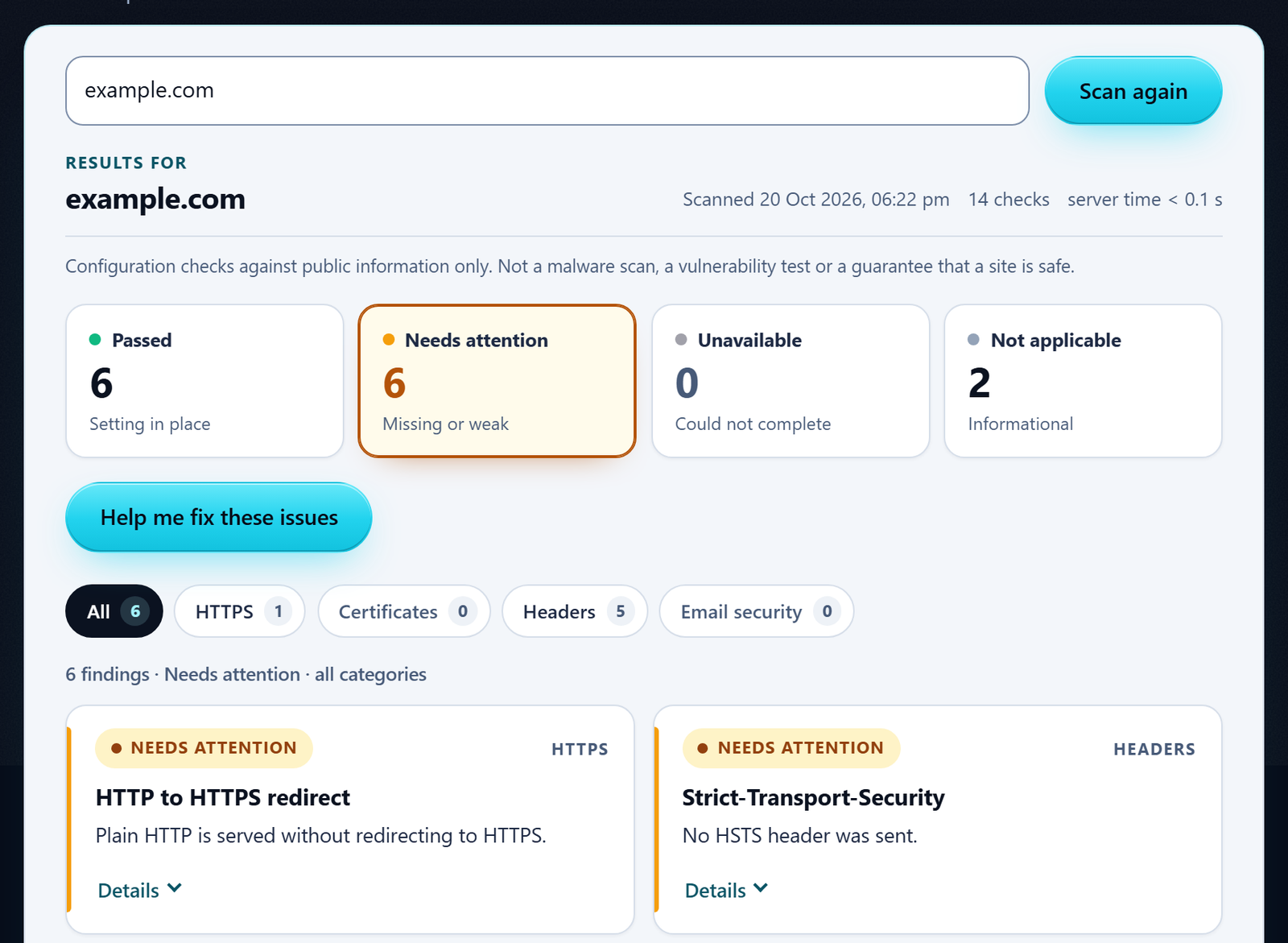
Results open as a dashboard. Four summary cards near the top count your findings by state: Passed, Needs attention, Unavailable and Not applicable. You get counts, never a score.
Each card is also a filter: select one to list only the findings in that state. The dashboard opens on Needs attention, so the findings worth acting on come first.
Category filters narrow the list further: All, HTTPS, Certificates, Headers and Email security. The list shows the findings that match both the selected card and the selected category.
Reading a finding card
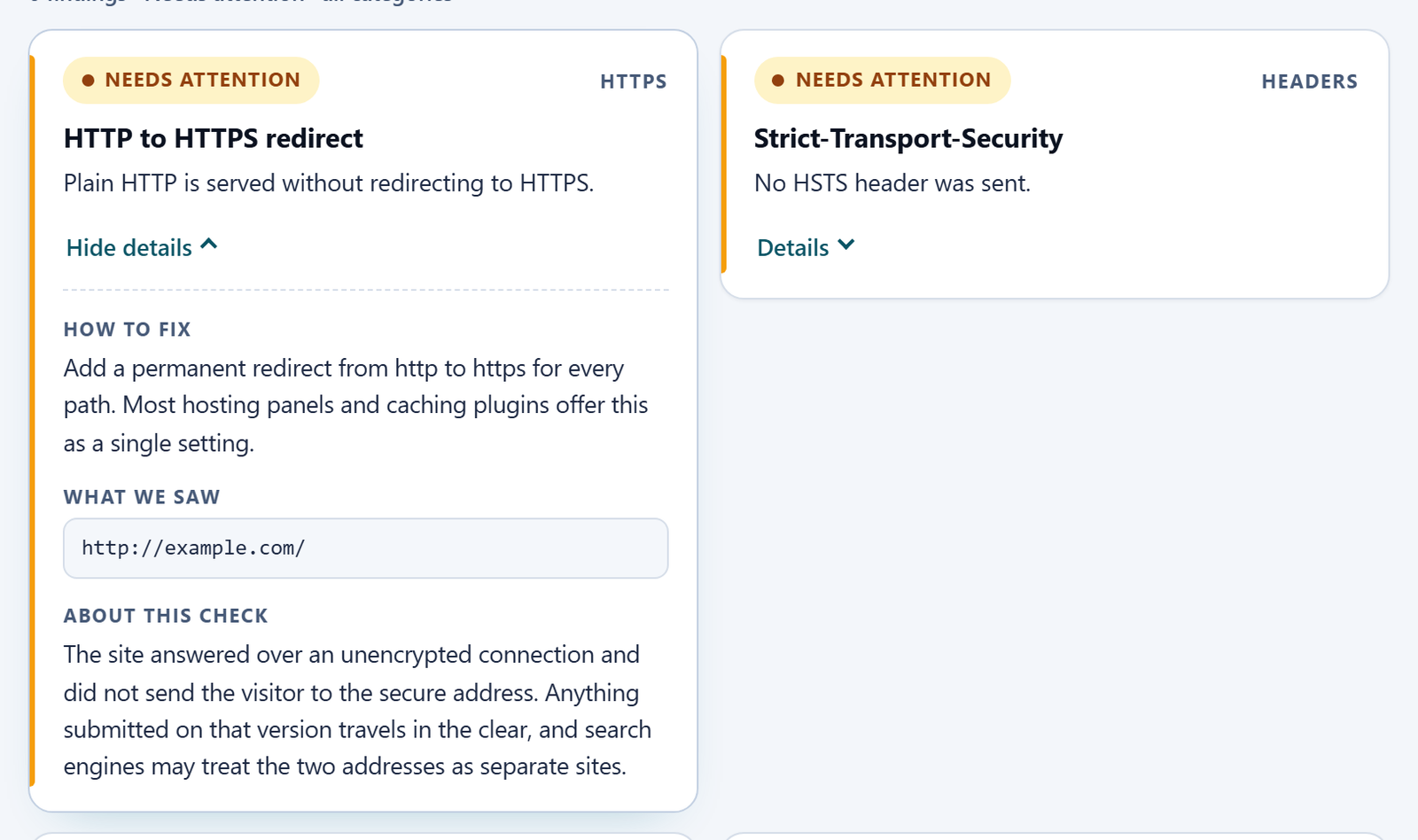
Each finding appears as a compact card showing its state, its title and a short explanation. Where there is more to say, a Details button opens up to three sections:
- How to fix: the suggested next step, when one is needed.
- What we saw: the evidence behind the result, such as a header value, a DNS record, or a certificate’s issuer and expiry date.
- About this check: what was tested, and what the result does and does not tell you.
What the four result states mean
There is no overall score and no letter grade anywhere in the report. Each finding is reported on its own, labelled with one of four states.
The label is only half the point. The explanation next to it is what tells you whether to act.
- Passed: the check ran and found the setting in place and doing something.
- Needs attention: the check ran and found something worth looking at.
- Not applicable: the finding is informational, or does not apply to this site’s setup.
- Unavailable: the check itself could not be completed.
Passed
The check ran successfully and found the setting in place and doing something.
A certificate check only passes once the connection has completed and the certificate chain has actually been verified. An SPF or DMARC record is not judged on its existence alone: its policy is checked too, and reported as a separate finding.
Needs attention
The check ran successfully and found something worth looking at. This one label covers a wide range, from a certificate that has already expired to a header that would only add hardening on a site that is not obviously exposed without it.
There is no separate “fail” state, and nothing here ranks severity for you. Read the explanation given with each finding to judge how urgent it is for your own site.
Not applicable
The finding is informational, or genuinely does not apply to this site’s setup. It is not counted as a problem either way. Two common cases:
- A domain that publishes no mail servers gets “Not applicable” on whether it can receive mail at all.
- A server that discloses its software version in its response headers gets “Not applicable” too, since hiding that string is not itself a security control.
Unavailable
The check itself could not be completed, for reasons that have nothing to do with whether the underlying setting is right or wrong. For example:
- a DNS lookup that timed out
- a firewall that blocked the request
- an HTTPS handshake that never finished
This state exists specifically so a check that failed to run is never quietly turned into a result.
Why “unavailable” is never turned into a false pass or fail
It would be easy to make every finding look decisive. If a DNS lookup times out, quietly reporting “no SPF record found” reads more cleanly than admitting the check did not work.
But it would also be false: the record might exist and simply not have answered in time. Reporting a pass instead would be worse, since nothing was actually verified either way.
When a check cannot complete, the only honest option is to say so.
Example
Suppose the DNS lookup for your SPF record times out while the check runs. Here is what the report does and does not say:
- Not reported: “No SPF record was found”. That would be a false Needs attention.
- Not reported: a pass. Nothing was verified.
- Reported: the SPF record finding as Unavailable, with “The SPF lookup did not complete.” and, under How to fix, “Try the check again in a few minutes.”
What the HTTPS and TLS certificate checks actually tell you
Three findings cover this. In the dashboard, two sit under the HTTPS filter and one under Certificates:
| Finding | Filter | What it checks |
|---|---|---|
| HTTPS connection | HTTPS | The site answers on port 443 with a certificate that could be verified. |
| TLS certificate | Certificates | How long the certificate has left before it expires. |
| HTTP to HTTPS redirect | HTTPS | Whether the plain http:// address redirects to the https:// one. |
HTTPS connection
This check confirms the site answers on port 443 with a certificate that could be verified against a trusted certificate authority list. Verification is never skipped just to produce a result.
TLS certificate
This check looks at the certificate’s validity window. One that has already expired, or is within about two weeks of expiring, is flagged.
One with a healthy amount of time left passes, with its issuer and expiry date shown as evidence under What we saw.
Example
The checker flags a certificate once it has 14 days or fewer left. Suppose a certificate has 30 days left when you run the check:
- Today: 30 days left. 30 is more than 14, so the certificate finding is Passed.
- 20 days later, if it has not renewed: 30 − 20 = 10 days left. 10 is 14 or fewer, so the same check now shows Needs attention.
HTTP to HTTPS redirect
A third check looks at whether the plain http:// address redirects to the https:// one.
A site that only serves the secure version when asked for it directly still leaves people connecting without encryption first. That includes anyone who types the bare address, or follows an old link.
What a pass does and does not tell you
What it tells you: a visitor’s connection to the site is encrypted, and their browser will not show a certificate warning.
What it does not tell you is at least as important. The domain-validated certificates issued by almost every certificate authority today, including the free ones most hosts provision automatically, confirm only that whoever requested the certificate controls the domain name.
They say nothing about who legally operates the business behind it. They say nothing about how securely the server itself is configured, or how safely any data collected on the site is handled once it arrives.
Encryption in transit and security of the server are two different things, and this check only ever tests the first one.
What security headers do
Five response headers are checked. Each does one specific job inside the visitor’s browser.
Every one of them is a configuration change on the server or in the CMS, not something that touches the site’s actual code.
- Strict-Transport-Security (HSTS): keeps returning browsers on HTTPS.
- Content-Security-Policy (CSP): tells the browser where scripts and other resources may load from.
- X-Content-Type-Options: stops the browser guessing a file’s type.
- Clickjacking protection: restricts which sites may show your page inside a frame.
- Referrer-Policy: controls how much of the current address is passed on.
Strict-Transport-Security (HSTS)
Once a browser has received this header from a site, it will insist on HTTPS for that host on every later visit, for as long as the header’s stated period lasts.
It will not fall back to plain HTTP even if a typed address or an old link asks for it. That closes the opening some downgrade attacks rely on.
The header being present is not enough by itself. A stated period of a few seconds does almost nothing, so a meaningful setting is measured in months, not seconds.
Example
The period is set with max-age, in seconds. The checker passes HSTS when max-age is at least six months, which it counts as 15,552,000 seconds:
180 days × 24 hours × 60 minutes × 60 seconds
= 180 × 86,400
= 15,552,000 seconds
So this header passes:
Strict-Transport-Security: max-age=15552000A header with max-age=300 (300 seconds, or five minutes) is present, but would be reported as Needs attention.
Content-Security-Policy (CSP)
This is a rule telling the browser which sources it may load scripts, styles, frames and other resources from.
If someone manages to inject a script into a page, a properly scoped policy stops the browser from ever running it. That makes this one of the stronger defences against cross-site scripting.
The check looks at whether the policy actually restricts where scripts may load from, normally through a default-src or script-src directive. A policy that does not, such as one containing only upgrade-insecure-requests, is reported as Needs attention, with an explanation of what the policy found actually does.
A policy that has one of those directives is still flagged if its source list is loose enough to let an injected script run, for example by allowing any host or inline scripts.
Beyond that, the check cannot confirm whether a policy is scoped correctly for a particular site. Judging that needs knowledge of what the site legitimately loads, which an outside check cannot have.
Getting the policy itself right takes care: too loose and it protects nothing, too strict and it breaks the page. That is part of why many sites still ship none at all.
Example
Two policies, judged by what they do rather than whether they exist. They illustrate how the check reads a policy; they are not policies to copy.
Content-Security-Policy: upgrade-insecure-requestsThis sets neither default-src nor script-src, so it places no limit on where scripts may load from. The check reports it as Needs attention, and its explanation says what this directive does instead: it tells browsers to fetch any http:// resources on the page over https://.
Content-Security-Policy: script-src 'self'This restricts scripts to the site’s own origin, so the check passes it. Whether it suits a real site still depends on what that site legitimately loads.
X-Content-Type-Options
Browsers sometimes try to guess a file’s real type instead of trusting the type the server declared. That can occasionally let a file meant to be plain data get interpreted and run as script instead.
Setting this header to “nosniff” turns that guessing off. It is a single fixed value with no configuration to get wrong, and there is little reason for any site not to send it:
X-Content-Type-Options: nosniffClickjacking protection
Without a framing restriction, another site can load your page inside an invisible frame and place its own content over it. That can trick a visitor into clicking something on your page they never meant to.
Either the older X-Frame-Options header or a frame-ancestors rule inside the Content-Security-Policy can satisfy this, but only if its value actually restricts anything.
A frame-ancestors rule that allows every site (written as *) is present without doing anything. So the check looks at what the rule actually permits, not just whether one exists.
When both mechanisms are sent together, current browsers follow the Content-Security-Policy rule and ignore X-Frame-Options.
Example
How the clickjacking finding reads three different setups, each sent on its own:
| Header sent | Result | Why |
|---|---|---|
Content-Security-Policy: frame-ancestors * | Needs attention | Allows every site to frame the page. |
Content-Security-Policy: frame-ancestors 'self' | Passed | Only the site itself may frame the page. |
X-Frame-Options: SAMEORIGIN | Passed | No frame-ancestors rule is sent, so the older header decides, and it restricts framing. |
The Content-Security-Policy finding is judged separately. A policy containing only frame-ancestors sets no default-src or script-src, so that finding would still need attention.
Referrer-Policy
This header controls how much of the current address a browser hands over when someone follows a link away from the site, or when the page loads something from elsewhere.
Every current major browser already defaults to a reasonably safe policy (strict-origin-when-cross-origin) when this header is left unset, so the gap is smaller than it once was.
Sending it explicitly still matters. It guarantees the same behaviour on older browsers and non-browser clients, rather than relying on a default that could change.
It also keeps the full address for links within your own site, while sending only the domain name on to everyone else.
Example
A visitor is on https://example.com/pricing/?plan=pro, and the site sends:
Referrer-Policy: strict-origin-when-cross-origin- Following a link to another page on example.com passes on the full address,
https://example.com/pricing/?plan=pro. - Following a link to a page on another site that uses HTTPS passes on only
https://example.com/.
SPF and DMARC: why mail authentication matters even if you barely send email
SPF and DMARC are DNS records, not settings inside an inbox. They exist to answer one question for whoever receives a message claiming to be from your domain: was this actually sent, or allowed to be sent, by you?
SPF: who may send as you
An SPF record lists which mail servers are allowed to send using your domain name. A receiving server checks the server the message actually arrived from against that list, and anything not on it fails.
Presence and strength are reported as two separate findings, because a record can exist and still be worthless.
One that ends in “+all” explicitly authorises every server on the internet to send as you, almost always by mistake. It is treated as a problem even though a record is technically published.
The safer endings are:
- “-all”: reject anything not listed.
- “~all”: mark it as suspicious.
The specification also caps how many DNS lookups a single SPF record may trigger. A record built from too many included services can go over that limit and stop being evaluated by receivers at all.
The check flags that too, in the SPF policy strength finding, even when the record’s ending is one of the safer ones.
Example
Three versions of the same SPF record, differing only in the ending. They are alternatives, not three records to publish together.
v=spf1 include:_spf.example.net +all
v=spf1 include:_spf.example.net ~all
v=spf1 include:_spf.example.net -all- +all: authorises every server, so SPF policy strength needs attention.
- ~all: asks receivers to treat unlisted senders as suspicious.
- -all: asks receivers to reject unlisted senders.
DMARC: what happens to mail that fails
DMARC builds on SPF and a second mechanism, DKIM. DKIM signs outgoing mail with a private key, so a receiving server can confirm the message was not altered in transit.
DMARC then adds a policy: what should happen to a message that fails both of those checks?
- “none”: only asks for reports and takes no action.
- “quarantine”: routes failing mail to spam.
- “reject”: refuses it outright.
As with SPF, presence and policy strength are reported separately. A record stuck on “p=none” indefinitely is monitoring, not protection.
The check also looks for a reporting address, so the reports are actually going somewhere.
Example
Suppose a domain, here the reserved example name example.com, published this DMARC record at _dmarc.example.com:
_dmarc.example.com. 3600 IN TXT "v=DMARC1; p=none; rua=mailto:dmarc-reports@example.com"- DMARC record: Passed, because a record is published.
- DMARC policy strength: Needs attention, because
p=noneis monitoring only.
The rua tag is the reporting address: it tells receivers to send reports to dmarc-reports@example.com.
Why it matters even if you send little or no email
None of this depends on how much mail you actually send. Anyone can put your domain in the “From” field of a message, regardless of whether you have ever sent one yourself.
A domain with little or no genuine mail traffic is not somehow protected from having its name borrowed this way. If anything it can be an easier target, since there is no legitimate traffic for a forged message to hide among.
A domain that sends no mail at all is also in the best position to close this off completely. An SPF record ending in “-all” and a DMARC policy of “p=reject” cannot block a real message, because there are none to block.
That is exactly why the checker treats a missing SPF or DMARC record as worth attention, regardless of whether the domain publishes any mail servers of its own.
Receiving mail and being impersonated as a sender are two different concerns, and only one of them depends on having a mailbox.
Example
For a domain that sends no mail at all, the SPF and DMARC records could look like this:
example.com.         3600  IN  TXT  "v=spf1 -all"
_dmarc.example.com.  3600  IN  TXT  "v=DMARC1; p=reject"
The SPF record lists no servers and ends in -all. The DMARC policy asks receivers to refuse mail that fails.
What this check is not
Everything above is configuration that is visible from outside a server, read without ever logging in or touching a file.
That scope is deliberately narrow, and it is worth being direct about what sits outside it.
- Not malware detection. The checker never looks at a site’s code, database or files for injected scripts, defaced pages or backdoors. A domain can pass every check here and still be running compromised code.
- Not a vulnerability scan. It does not probe for outdated plugin versions, known CVEs, SQL injection, or any of the specific weaknesses a dedicated scanner is built to find.
- Not a penetration test. Nothing here actively attempts to exploit anything. A real penetration test needs your written authorisation, an agreed scope, and someone actually trying to get in.
- Not a guarantee. A clean result reflects what was checked, from the outside, at the moment you ran it. Configuration changes, certificates expire, and new weaknesses get discovered afterward; a pass today is not a promise about next month.
Some needs go beyond what a free, automated check can responsibly claim:
- confirming what an actual attacker could reach
- reviewing server-side configuration this tool cannot see from outside
- a written report you can hand to a client or an insurer
That is scoped and quoted work in its own right, not something a free tool should pretend to offer for nothing.
Want a closer look than an automated check can give?
A scoped security review looks at what this checker cannot reach from outside, agreed in writing before anything starts.